CRMb Is Now on Google Play: CRM and Job Costing for Android
CRMb is now on Google Play. Your clients, your jobs, your invoices, your job sites and your books now come with you on Android, on the same account you already use on the web, iPhone, iPad and Mac. Download it, sign in, and your whole business is there.
CRMb launched on the App Store in August for iPhone, iPad and Mac. Plenty of crews run on Android, and plenty of owners carry one. As of today, they get the same CRMb.
The whole business, on your Android phone
CRMb for Android is not a stripped-down companion app. It is CRMb: the same clients, the same jobs, the same numbers, built for the phone in your pocket.
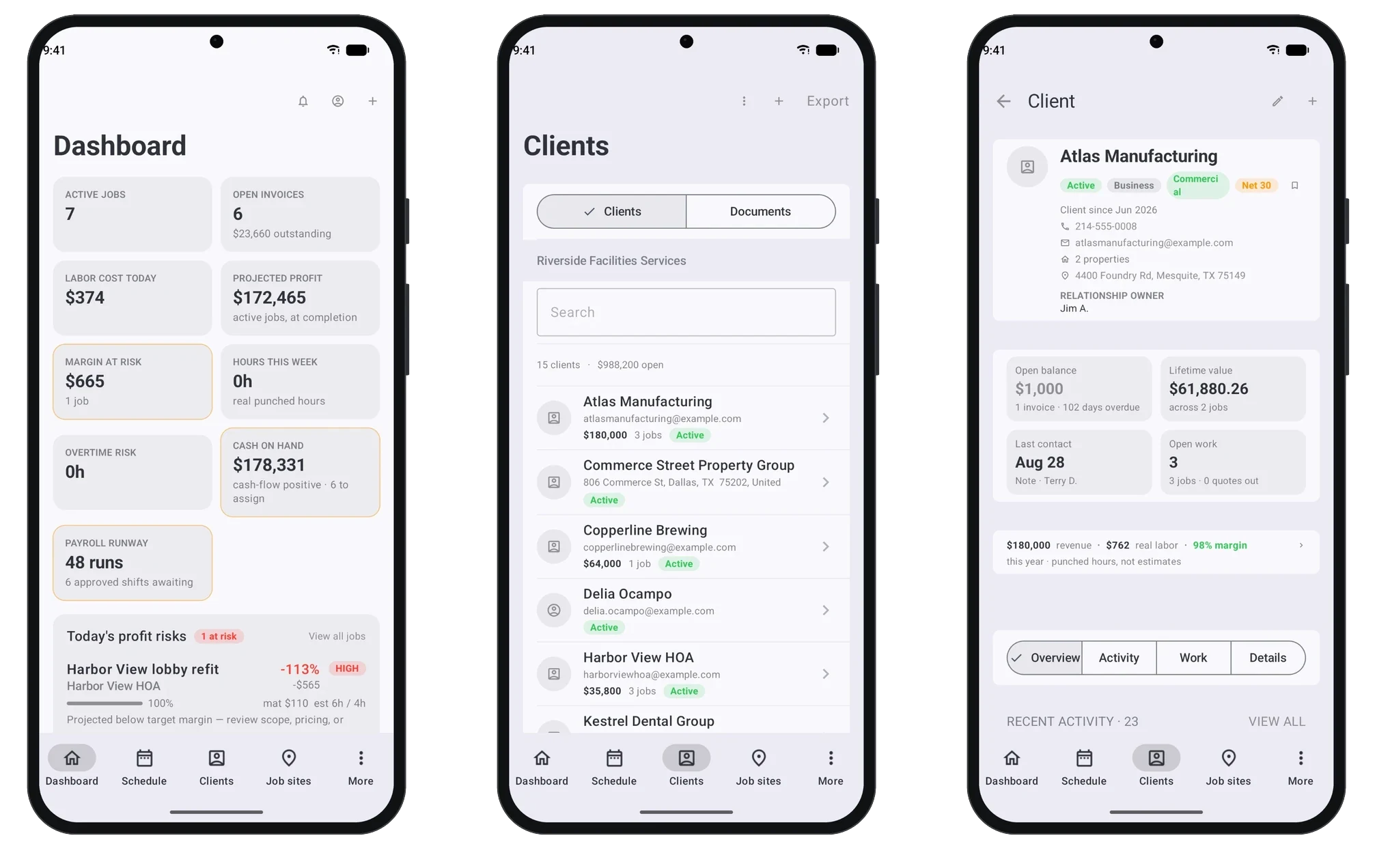
Your dashboard. Open the app and the day is waiting: active jobs, open invoices, today's labor cost, projected profit, the margin at risk, overtime risk and cash on hand. Jobs that are drifting below your target margin show up under today's profit risks, so you see them while there is still time to act.
Your clients. Every client in one searchable list, with what each one is worth and how many jobs you have going for them. Open a client and the whole story is there: how to reach them, their open balance, their lifetime value, when you last talked, and the work still open. Below it sits the margin you made on them this year, on hours your crew actually punched, not estimates.
Your pipeline and your team. Move jobs and tasks across a board, a list or a timeline, and @mention a teammate in a comment so the right person sees it. Schedule your crew and see who has room.
Quote, invoice and get paid from anywhere
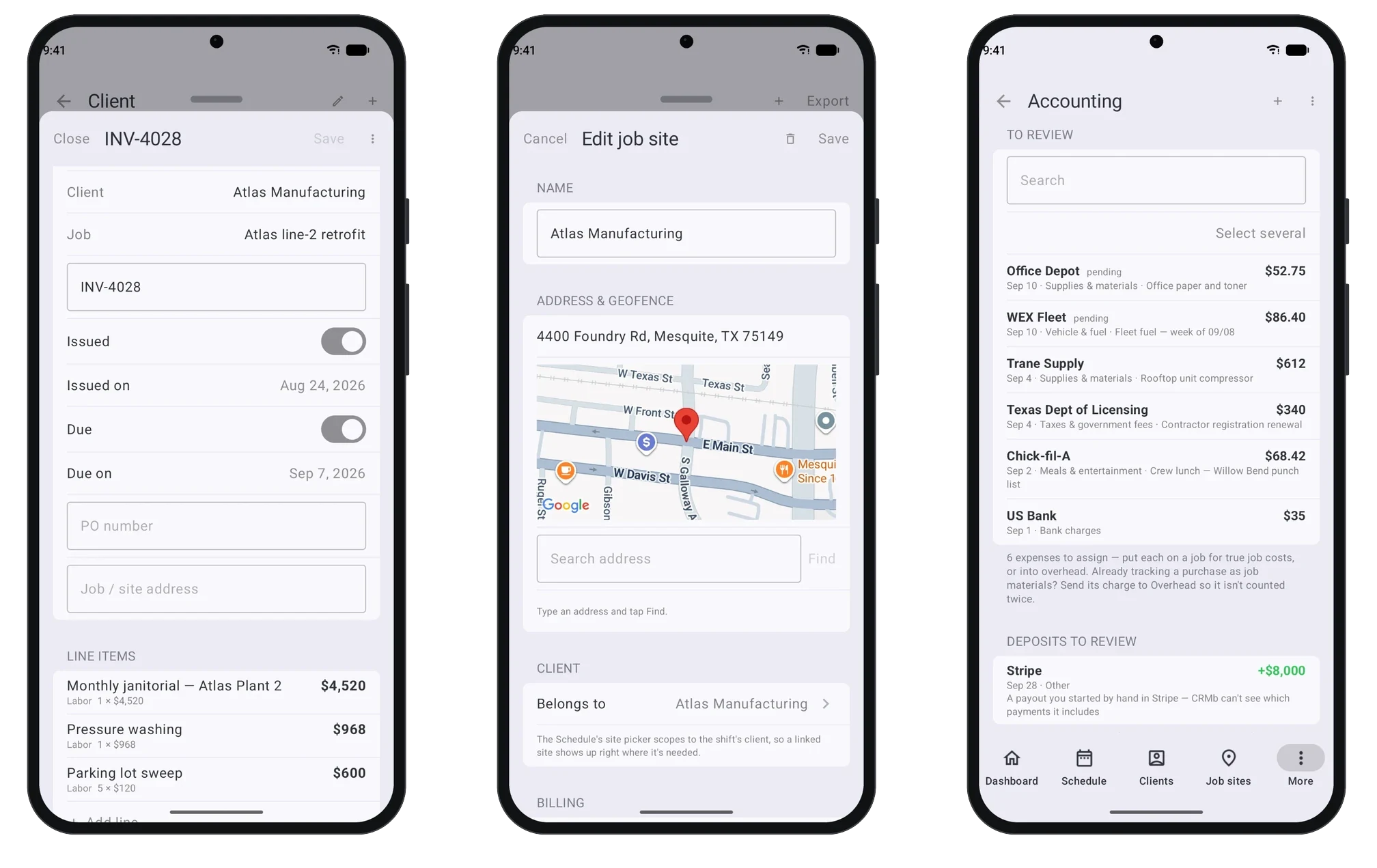
Quotes and invoices. Write a quote or an invoice right from your phone, with your branding, its issue and due dates, and line items pulled straight from the job: the labor your crew really worked and the materials you really used. Clients can pay online by card or bank transfer, and every payment lands on the invoice it paid, so you always know what is still outstanding. If you have not billed your hours this way before, how to invoice for a plumbing job walks through it line by line.
Job sites. Every place you work gets an address, a pin and a geofence. Search the address, set the fence, and link the site to the client it belongs to. Sites live once and work everywhere, in CRMb and in Punch, the time clock your crew already punches in on.
Your books. Connect a bank account and the money that moves shows up to review. Put each expense on a job so it lands in that job's real cost, or into overhead under a category. Deposits wait beside it, so nothing goes uncounted. The bank connection is read-only, always: CRMb keeps your books, it never moves your money. Reconciling bank transactions to jobs explains why that one habit changes what your job profit tells you.
Inventory and purchasing. If you add Inventory, your stock across warehouses and trucks comes along too, with purchase orders, receiving, and materials on every job at real cost.
One account, every device
Nothing about your setup changes. Sign in on Android with the account you already use, and you land in the same business, with the same clients, jobs and numbers you see on the web, your iPhone, iPad and Mac. Change something on your Android phone and it is there on the office Mac too.
That matters most for teams where nobody carries the same phone. The owner on an iPhone, the office manager on a Mac, the lead tech on an Android: one business, one set of numbers, no one left out.
Why the numbers are real
Every CRM can tell you what you billed. CRMb tells you what you kept.
Because CRMb shares a workspace with Punch, every hour your crew punches becomes real labor cost on the job it was punched at. Your margin is not a guess built on estimated hours; it is computed from hours that actually happened. That is true on Android exactly as it is everywhere else: the profit on the dashboard, the margin on a client, the labor on an invoice all come from the same real hours.
If you want to go deeper on that idea, start with job costing for service businesses, then see why a spreadsheet stops working once a business has more than a handful of jobs going at once. And because labor is only half of a job's real cost, how to calculate your labor burden rate shows what an hour of your crew's time truly costs you.
Frequently asked questions
Is CRMb on Android the same app as on iPhone?
Yes. It is the same CRMb on the same account: your clients, jobs, invoices, job sites and books are all there, and whatever you change on one device shows up on the others.
Do I need a new account to use CRMb on Android?
No. Sign in with the account you already use on the web, iPhone, iPad or Mac, and your business is waiting. If you are new to CRMb, create your account in the app and your business starts on a 14-day free trial.
Is there a free trial on Android?
Yes. Every new business starts with a 14-day free trial, wherever it signs up.
Does my crew need CRMb to punch in?
No. Your crew punches in on Punch, and their hours flow into CRMb's job costs, schedules and reports on their own. You only need CRMb for the people who run the work: planning, quoting, invoicing and keeping the books.
Where else does CRMb run?
On the web at crmb.io, and as one app for iPhone, iPad and Mac on the App Store. Now on Android through Google Play, too.
Getting started with CRMb
- Android: Get CRMb on Google Play
- iPhone, iPad and Mac: Download CRMb on the App Store
- Web: crmb.io/app
Start with a 14-day free trial and see pricing whenever you are ready. To see what each part of CRMb does, take a look at Clients, Accounting and Scheduling.